
Quick Summary
- A VPN proxy combination adds a routing step, but not automatic privacy; connection order affects what each provider can see.
- It can help when an app needs a proxy or for approved regional testing, but extra hops can slow traffic or cause blocks.
- The article also covers VPN options for work and cloud and explains how to test IP and DNS leaks, app bypasses, and disconnect behavior. For more on safeguards, see our VPN privacy guide.
A VPN proxy combination puts both services in one connection path. This adds another step between your device and a website, but does not automatically make you safer. The result depends on which service connects first, what each one can see, and what happens if one disconnects. First decide what the extra step is meant to accomplish.
Understand the Order of a VPN Proxy Combination
In one common setup, an app sends its traffic through a proxy, while the VPN encrypts the connection from your device to the VPN server. The local Wi-Fi network can see that you connected to a VPN. The VPN company may see that you connected to the proxy, and the proxy may see which website the app contacts. The details depend on settings and encryption. MDN’s proxy guide explains how a proxy relays requests between an app and a website.
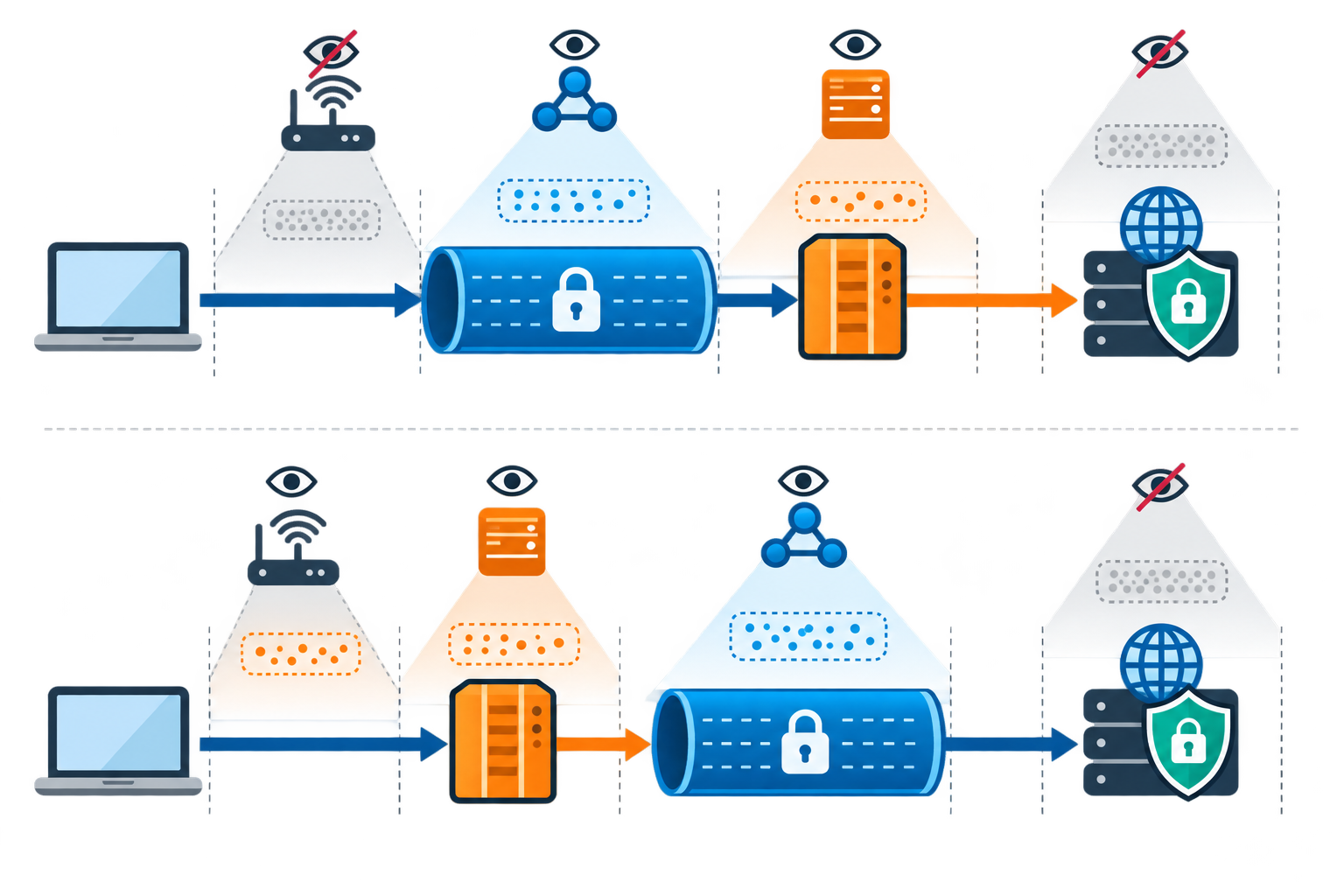
The order can also be reversed. Each order changes which company can see your original address or the website you visit. A VPN encrypts traffic only between your device and its server; it cannot protect every step after traffic leaves that server. Draw the route before deciding what the setup hides.
Think of the setup as a chain: every service may see part of your connection, and each can fail in a different way.
When a VPN and Proxy Together May Help
A combined setup can be useful when a specific application must use a proxy while the device also needs protection on an untrusted local network. Developers may also need separate controls for regional testing and general traffic. In a managed environment, the combination may be required by a documented security or access policy.
For ordinary browsing, streaming, and remote access, the added layer may provide little value and can create more points of failure. Some services block proxy or VPN addresses, and some apps ignore system settings. A connection may slow down because of extra routing, congestion, and protocol overhead. If you cannot explain why each hop is needed, keep the design simpler.
Benefits and Trade-Offs at a Glance
The useful question is whether each service solves a specific problem. More services can also mean slower connections and more chances for something to go wrong.
| Consideration | Potential benefit | Possible cost |
|---|---|---|
| Traffic scope | Separate routing for selected apps | Some apps may bypass the chain |
| Local network | VPN can protect the first hop | VPN endpoint still sees metadata |
| Location testing | Proxy can provide a targeted route | Destination may block the address |
| Privacy | Split visibility across operators | Trust shifts to multiple providers |
| Performance | May satisfy specialized workflow | More latency and failure points |
Configure and Test the Chain Carefully
Document the intended route for each application, including DNS. Confirm whether the VPN client routes proxy traffic through its tunnel, whether the proxy supports the app’s protocol, and whether credentials are protected. Use trusted providers, unique credentials, and current software. Never paste sensitive data into a proxy configuration form or install unverified certificates to “fix” compatibility.
Test the public IP, DNS resolver, and route while connected, then repeat after disconnecting either component. Check whether a kill switch blocks direct traffic if the VPN drops. For IPsec-based deployments, RFC 4301’s architecture overview helps explain the role of security associations and policy, but consumer clients may use different protocols and interfaces.
A Practical Decision Rule
Use a single VPN when you need a broad encrypted path, or a single proxy for a controlled app-specific route. Add the second component only when you have a concrete requirement and can verify its configuration. Review each provider’s logging and retention practices; adding providers creates additional trust relationships rather than erasing them. The FTC’s VPN-app guidance recommends checking permissions, encryption, and data sharing before trusting an app with your traffic.
If you need corporate access, follow the company’s supported design. If the goal is privacy, remember that accounts, browser fingerprints, cookies, and endpoint security still matter. A well-tested VPN proxy combination can solve a specialized routing problem, but simplicity is often safer, faster, and easier to troubleshoot.
Use both tools only when testing shows the extra step is needed. Keep a simple diagram of the route and retest it after app updates or network changes.
Remote, Cloud, and Enterprise VPN Setups
VPNs are used in several different ways. A personal VPN service routes one person’s device through a provider’s server. A remote-access VPN connects an employee’s device to a company network. A site-to-site VPN connects office networks through gateways. A cloud VPN provides access to applications and networks hosted in cloud infrastructure, so a business may not need to route every worker back through one physical office.
Cloud VPN designs often include a gateway connecting an office network to a cloud network. High-availability designs use redundant gateways or tunnels so that one failure does not cut off access; a simpler single-gateway design may be easier to deploy but has fewer backups. Some cloud services advertise specific availability targets, but the actual service-level agreement and configuration determine what is promised. Failover, routing, firewall rules, and backup connections should be tested.
An enterprise VPN differs from a consumer VPN because a company needs central user management, role-based access, audit records, support, and predictable maintenance. A managed service may provide updates and vendor support for a subscription. A self-hosted VPN gives the organization more direct control but requires its own staff, hardware or cloud capacity, patching, monitoring, and incident response. Neither model is automatically cheaper: include staff time, licenses, hardware, and service support in the comparison.
Before rolling out a company VPN, a team should map users, apps, network capacity, and firewall rules; connect the service to the company’s sign-in system; test backup connections; and try it with a small group first. Larger organizations may link the VPN to their existing account and sign-in tools so employees can use familiar work accounts.
Zero Trust Network Access (ZTNA) is a related approach, not simply another name for a VPN. A traditional VPN may connect a user to a broader network after sign-in; ZTNA checks identity, device condition, and policy for access to a specific app or resource. Some organizations use both during a gradual transition, keeping VPN access for older systems while limiting newer cloud apps more narrowly.
SSL VPNs commonly use a browser or lightweight client to provide access to selected apps. A portal-style SSL VPN opens approved web apps through a secure page; a tunnel-style SSL VPN can carry traffic for more than one service and may need a client component. IPsec VPNs are often used for broader network connections and may involve more involved configuration. Browser-based access is convenient, but users still need updated browsers and protection against phishing or malicious downloads.
A VPN router puts the VPN connection on the router so several home devices can use it. Routers may be VPN-compatible, sold preconfigured, or manually updated by a technically experienced owner. The trade-offs are upfront cost, device compatibility, shared processing capacity, and less flexibility to choose a different server for each device.
Cloud VPN, Enterprise Controls, and Deployment Planning
Cloud VPNs let a business connect an office network or remote users to cloud-hosted apps and data. Site-to-cloud access links a company network or user to a cloud network; site-to-site access links whole office networks. A cloud service may use redundant gateways and tunnels. Common patterns include two peer devices for separate paths, or two tunnels to one peer device with one or more public addresses. More than one path can support failover and maintenance, but only if routing and recovery are configured and tested. Availability percentages vary by provider and plan.
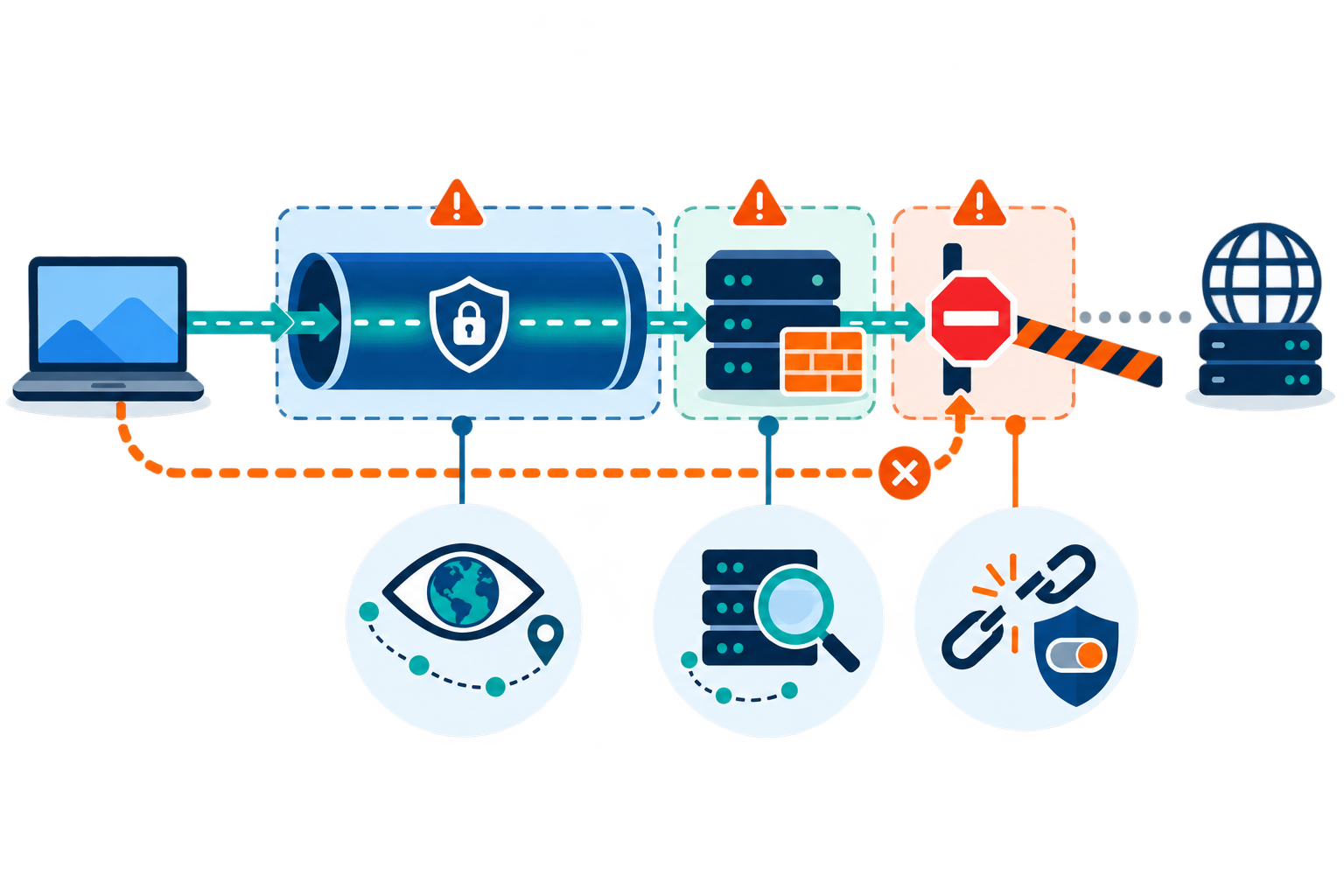
Cloud VPNs can help remote workers reach approved work apps and help companies test how a site appears in another region. A fixed IP address (one that stays the same) can be added to an allowlist (a list of approved addresses), but it does not replace user sign-in or access rules.
Enterprise VPNs add central administration that consumer VPN apps usually do not provide. IT teams can create groups, limit which resources each role can reach, use multifactor authentication, and keep records for audits. Managed services may include vendor support and updates; a self-hosted system gives the organization more control but makes its own team responsible for upgrades, capacity, monitoring, and incident response. Compare total cost, staffing, support commitments, security certifications required for your industry, integrations, and the provider’s track record.
Before buying, list users, locations, apps, compliance needs, and expected growth. Check capacity for peak usage, directory and single-sign-on connections, security-monitoring integrations, and a representative pilot. A safe rollout usually starts with an infrastructure review, DNS and certificate setup, firewall rules documented by the vendor, user groups, primary and backup gateways, and failover testing. Introduce the system to IT staff first, then a small pilot group, then everyone else. Monitor successful connections, latency, bandwidth, and support issues; document changes for troubleshooting.
Some enterprise tools use analytics or automation to predict congestion, select routes, prioritize business apps, flag unusual sign-ins, or detect equipment problems. These features can help IT teams, but they do not replace encryption, updates, access limits, or human review. ZTNA is a related model that checks access to specific apps using identity and device context; companies may run it alongside a VPN while older systems are being updated.