
A proxy routes one app through a server, while a VPN encrypts broader device traffic.
Quick summary:
- A VPN usually routes more of your device’s traffic through an encrypted tunnel; a proxy typically routes one app or selected requests.
- The comparison covers six practical differences: coverage, encryption, setup, visibility, provider trust, and speed. A proxy is not automatically faster or secure.
- For public Wi-Fi or several apps, a trusted VPN is often the better starting point; use your employer’s VPN for work. A proxy fits a narrow task like regional page testing.
- Neither tool guarantees anonymity: websites can still recognize accounts, cookies, or browser settings, while the VPN or proxy operator may see parts of your connection.
- HTTPS, safe accounts, and device security still matter. A VPN cannot stop malware or phishing, and private browsing mainly limits history saved on your device.
- Check DNS/IP leaks and what happens if the tunnel drops. Split tunneling leaves selected apps outside the VPN, so test the setup you plan to use.
Choosing a privacy tool is easier when you start with the job it must do. A proxy vs VPN comparison is not simply a contest between two ways to hide an IP address: one usually handles selected application requests, while the other can protect broader device traffic and add encryption. The right choice depends on the threat, the apps involved, and the amount of setup you can manage.
How the Two Connections Work
A proxy sits between an application and a destination server. The application sends a request to the proxy, which forwards it and returns the response. A browser proxy may affect only browser traffic; a proxy configured in one app may leave every other app untouched. This makes proxies useful for narrowly scoped routing, testing a site from another region, or changing the apparent source address of a particular request. MDN’s guide to proxy servers and tunneling explains how forward and reverse proxies fit into a web request.
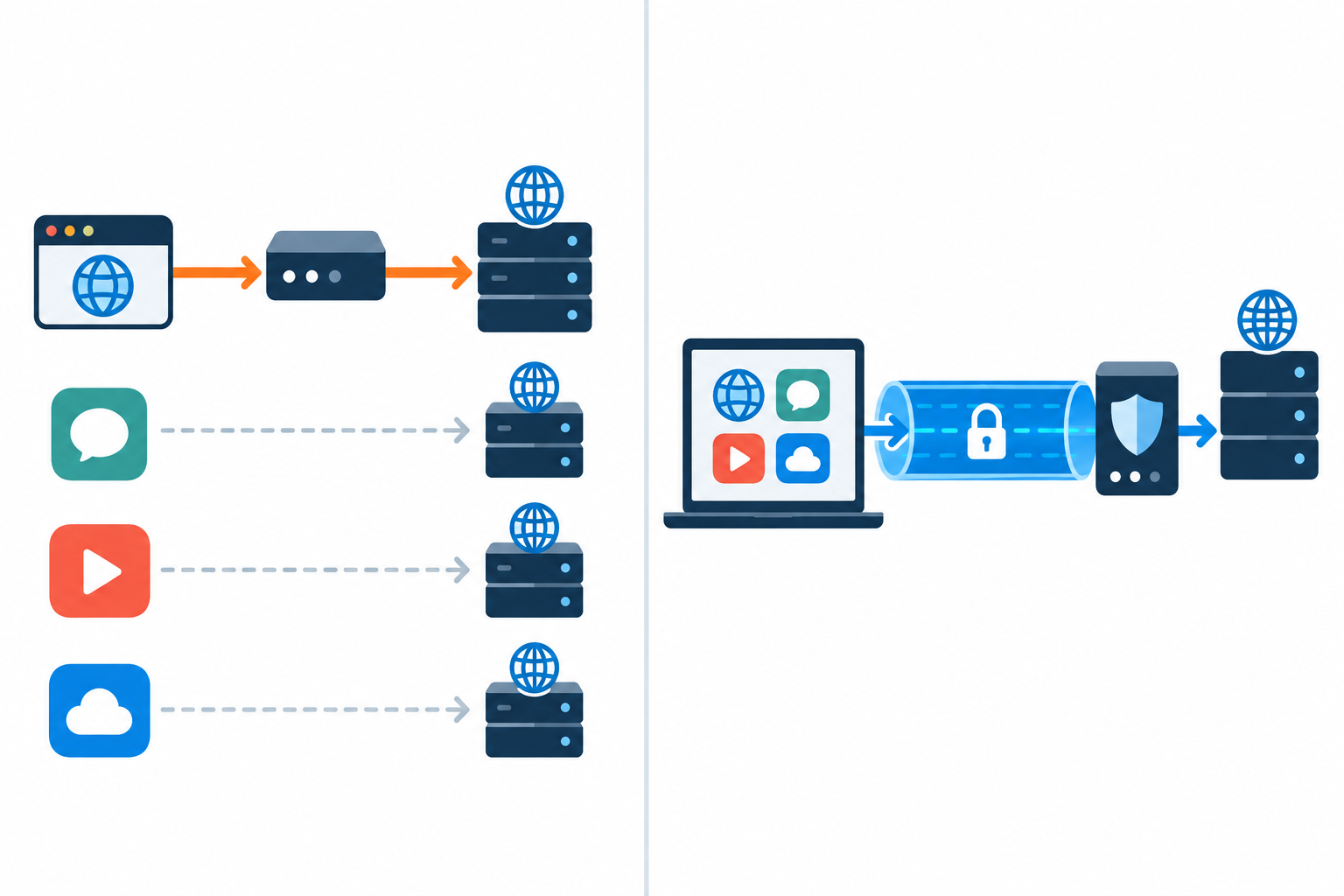
A VPN creates an encrypted tunnel between a device or network and a VPN gateway. Depending on its configuration, it can route most or all device traffic through that tunnel. Encryption protects data in transit from local observers, but it does not make a user invisible to websites, guarantee trustworthy provider practices, or protect against malware already on a device.
Keep scope and encryption separate: a proxy often covers one app, while a VPN usually covers more of a device’s traffic.
Proxy vs VPN: Six Differences That Matter
The practical differences are scope, encryption, setup, visibility, provider trust, and performance. A proxy may be fast and convenient for one browser task, but ordinary proxies do not automatically encrypt the connection between your device and the proxy. A VPN typically covers more applications and encrypts the tunnel, though the destination website still sees account activity, cookies, and other identifying signals.
Neither tool should be treated as a complete security system. A proxy operator may be able to observe connection details or unencrypted traffic. A VPN provider can see traffic leaving its gateway, even when the local network cannot read the encrypted tunnel. Review the service’s logging policy, technical design, and independent assessments rather than relying on a privacy slogan. The FTC’s VPN-app guidance recommends checking permissions, encryption, and data-sharing practices.
Quick Comparison
Use this table as a starting point, then test the exact apps and networks involved. Features vary by provider and configuration, so confirm what traffic is actually routed before relying on either option.
| Factor | Proxy | VPN |
|---|---|---|
| Typical scope | One app or selected traffic | Device or network traffic |
| Encryption | Not automatic | Encrypted tunnel is typical |
| Setup | Often app-specific | Client, router, or managed profile |
| Best fit | Targeted routing and testing | Public Wi-Fi and broader protection |
| Main caution | Operator visibility and weak security | Provider trust and tunnel limitations |
Which Tool Fits Your Situation?
Choose a VPN when you need to protect traffic on an untrusted Wi-Fi network, connect to a work network, or route several applications through one encrypted connection. For work access, use the organization’s approved VPN rather than a consumer service. Check whether split tunneling is enabled and whether DNS requests follow the intended route.
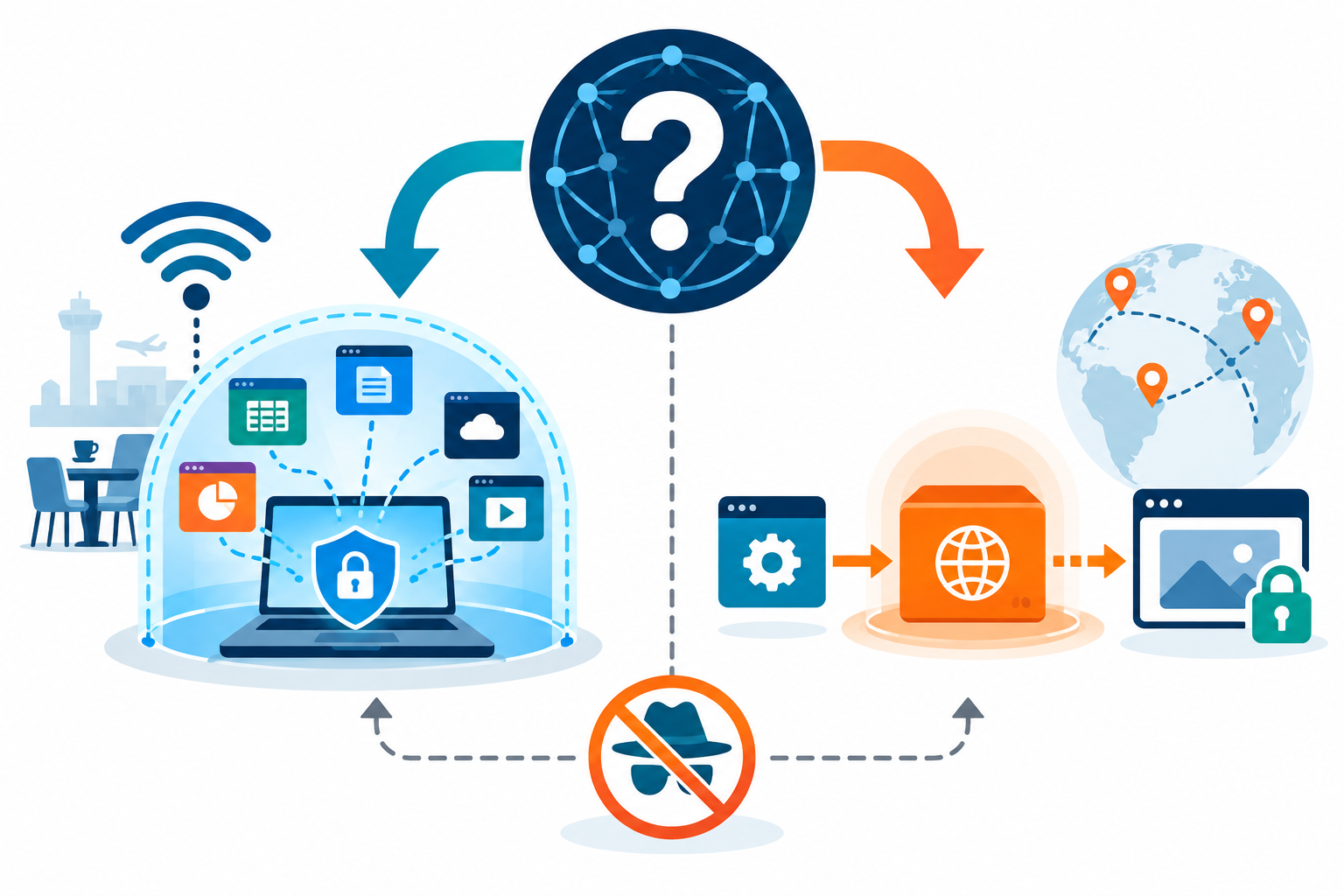
Choose a proxy when the task is deliberately limited, such as checking localized website behavior or routing a specific application. Avoid sending passwords, payment details, or sensitive business information through an unknown proxy. HTTPS protects the connection to a site, but it does not establish that the proxy operator is trustworthy or that every app is configured correctly.
Before choosing, test the exact device, app, and network you plan to use.
Limits, Safety Checks, and a Decision Rule
Before connecting, ask what data is exposed, which applications are covered, who operates the intermediary, and how a failure is handled. Test for DNS and IP leaks. DNS (the domain name system) turns a website name into a network address; a DNS leak means those lookups go outside the VPN tunnel. Also confirm the destination still uses HTTPS, and keep operating-system and browser protections enabled. When evaluating an IPsec-based VPN design, the standards overview in the IPsec architecture specification explains the security framework; it is a technical reference, not a product endorsement.
A useful rule is to choose the simplest setup that meets your needs. For a low-risk task in one app, a trusted proxy may be enough. On shared Wi-Fi or for sensitive traffic, a well-configured VPN is often a better starting point. For company or regulated data, follow your organization’s policy and ask IT if you are unsure.
Recheck your choice when the task changes. Ask who runs the service, what information it can see, and what happens if the connection drops.
What a VPN and Proxy Can—and Cannot—Hide
VPN means “virtual private network.” A VPN creates an encrypted connection, often called a tunnel, between your device and a VPN server. The server then sends your request to the website. The website usually sees the server’s IP address, while your internet provider can see that you connected to a VPN, but should not be able to read the contents of the tunnel.
A proxy also sends a request through another server, but it is usually set up for one app or one kind of traffic. Some proxy connections can be encrypted, such as when HTTPS protects the connection to the website or when the proxy supports an encrypted client connection. Encryption is not automatic for every proxy, so check the exact setup. In that sense, a VPN can be understood as a type of encrypted forward proxy, but commercial VPN apps usually cover more of a device and use dedicated VPN protocols.
Neither tool makes you fully anonymous. A website can still recognize you when you sign in, and cookies or browser settings can help link visits together. Private-browsing mode mainly stops your browser from saving some history and cookies on your device; it does not hide your connection from your Wi-Fi network or internet provider. HTTPS protects the content exchanged with one website, while a VPN protects the connection from your device to the VPN server. They can work together.
Some VPN apps offer split tunneling. This lets you choose which apps use the VPN and which connect directly. It can be useful for a work app or a local device that needs a direct connection, but the excluded traffic will not use the VPN tunnel. Check the settings rather than assuming every app is covered.